
This is why we need the ELI5(Explain like I’m 5) explanation
Git has been explained very well and in-depth numerous times in Youtube videos, websites and blogs. But one common criticism of git is that it can be very difficult to grasp as a beginner and its working can be quite complex.
So, I believe it needs a Explain like I'm 5 version to help a beginner with no technical knowledge to understand the basic working and the benefits of Git.
So, let’s dive right in
Let’s assume you are working on an essay with a friend. you write 3 paragraphs and then your friend comes along and writes 3 more paragraphs. Then you edit a few paragraphs and your friend does too.
At the end of the collaboration, you find out that there are some issues but it’s hard to know who edited which part and when.

Here Git comes to the rescue, when you start the work, you create the file on a git server and you add your changes to your file. Then when you are done with your changes, you commit(save) your changes to the repository(the storeroom of your work). You are basically informing the server that “this file exists and it looks like this”
Now, when your friend checks out that repo(repository) and pulls(updates his local file to match the latest commit) the latest changes, he gets the updated version including your changes. He then adds some of his own stuff and then commits his work to the repo too.
Now the repo will say that “this file exists and is different from the previous version which is why it will be saved as version 2”.
This goes on as long as work is done on the file. Meanwhile, the Git repo allows you and your friend to make edits and keep the changes in a sequence so that when something goes wrong. For example if the version 7 is ruined, you can just ask Git to give you the 6th version and then you can go into fixing mode. Every commit made contains information like the owner of the commit which helps in identifying who made the changes and you can compare the changes and check out what went wrong.
Now let’s talk about branches.
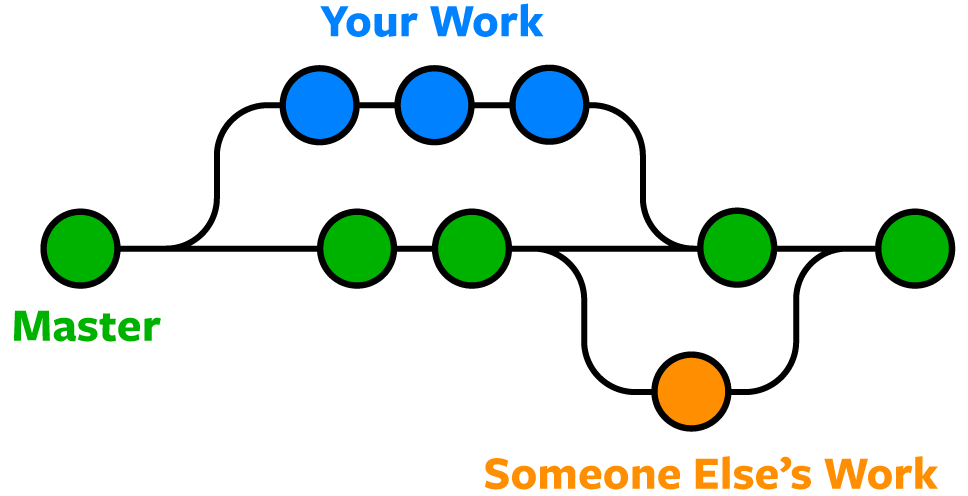
Branches must be reminding you of trees, well good because it works just like in a tree.
You just have to think of the main git repo like a straight path that works just like the trunk of the tree(aptly called the master).

If you want to keep on working on this path but your friend wants to work on something different or maybe wants to go on a different path(get it ?), he can create a new branch which creates a new path in the git repo that originates from the master just like branches on a tree.
This has many benefits one of which is that this helps you work independently without affecting the master/main branch so that it doesn’t affect other’s work. Think of it in this way , if one branch on the tree gets damaged and falls off, the tree still has the perfectly stable trunk(master branch) from where it can grow again.
The End
If you have reached till here , you have received enough understanding to start using Git and dive deep into the inner workings of Git. You now know how essential Git is and how it can drastically improve the level of collaboration and the efficiency of a team working together on a project.
Tell me your thoughts below in the comments and maybe share your own ELI5 analogies.