Part 3 of a three-part series on building an iOS App Clip from an existing React Native app. Part 1 covered the design and the "one codebase, two apps" architecture; Part 2 is the hands-on setup guide. This part is about the single hardest constraint: the size budget.
TL;DR
- Apple caps App Clips at ~15 MB uncompressed; React Native's runtime plus autolinked native modules blow past that by default — the clip links everything the full app does.
- The fix is a custom
appClip: falseflag that excludes heavy modules from the clip target — but it isn't built in, so you patch the RN toolchain (CLI schema + autolinking + Fabric codegen) to honor it, driven by anAPP_CLIPenv flag in the Podfile.- Design the clip to survive the cuts (core RN UI, minimal auth), and treat the size limit as a CI-enforced invariant, not a manual check.
By now you can build and launch a React Native App Clip (Part 1 for the architecture, Part 2 for the setup). There's one problem standing between "it runs" and "it ships" — and every React Native App Clip hits it, regardless of what the clip actually does.
Reuse was the right call for velocity and consistency. But it collides head-on with a hard rule from Apple, and that collision is where most of the real engineering went.
The hard constraint
An App Clip must be tiny. Apple caps the App Clip's uncompressed size:
- Originally the limit was 10 MB.
- It was later raised to 15 MB (for clips built with a recent-enough deployment target).
Either way, this is a brutal budget. The whole point of an App Clip is that it downloads and launches instantly, so Apple enforces smallness at submission time — go over, and it won't ship.
Now consider what React Native brings to the table:
- The JavaScript runtime (Hermes) and the React Native core.
- Every native module you depend on — animation engines, maps, media pickers, blur views, browser wrappers, and so on.
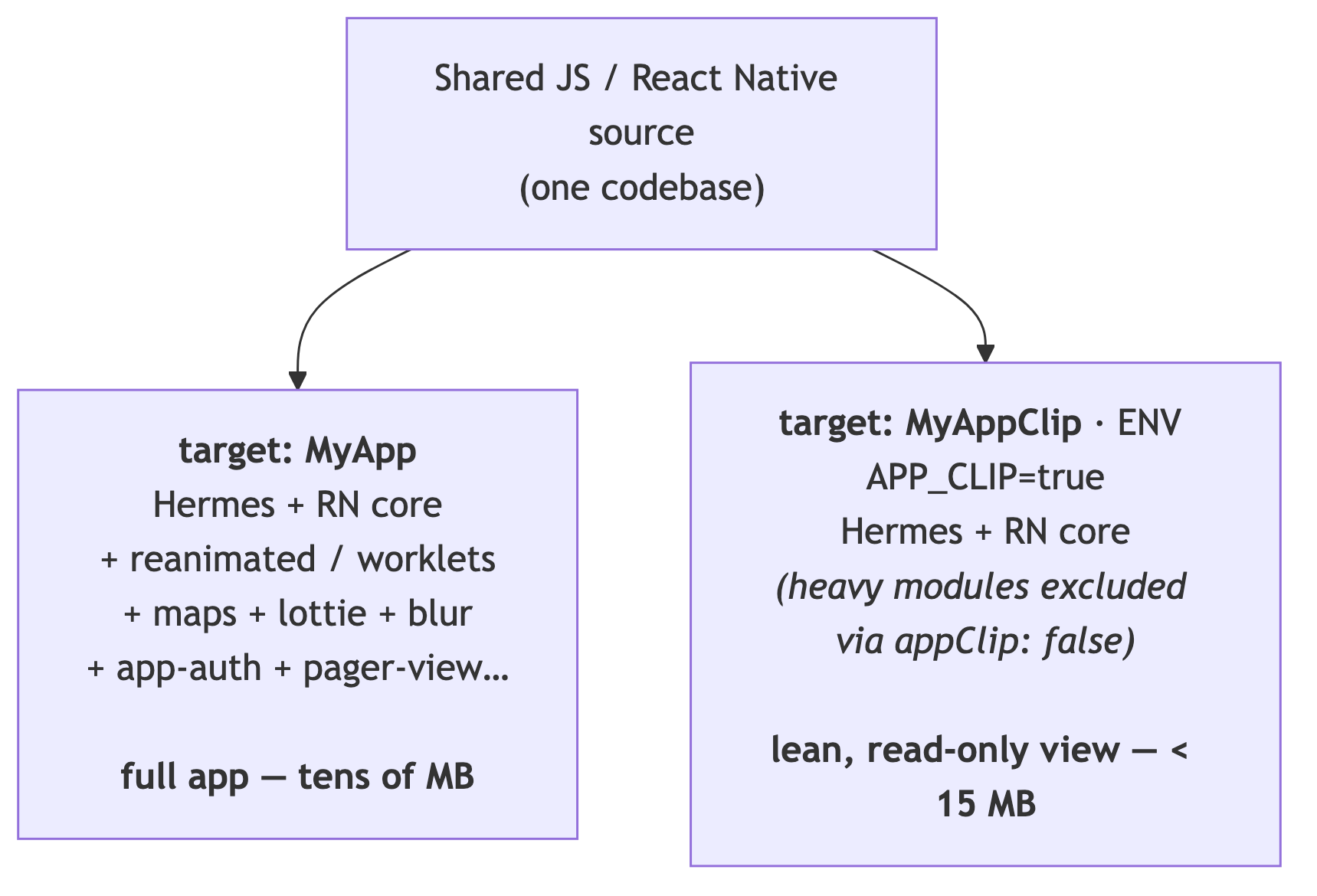
A normal full RN app happily weighs tens of megabytes. And here's the specific trap: React Native's autolinking pulls in all of your native dependencies automatically. By default, your App Clip target would link the exact same set of native modules as your full app — maps, Lottie, Reanimated, everything — whether the clip uses them or not.
So the default outcome is: your App Clip is as heavy as your app, and it blows the budget before you write a single feature. The engineering problem is: how do we make the clip link only the native code it actually needs?
The lever: selective autolinking per target
React Native's autolinking is configured through react-native.config.js, and by default it
links every native dependency into every iOS target. Out of the box there is no built-in
way to say "link this into the full app but not into the App Clip" — React Native has no
concept of an App Clip target at all.
So we invented one: a custom appClip flag on each dependency. We went through the dependency
list and, for every heavy native module the clip doesn't need, added appClip: false:
// react-native.config.js
module.exports = {
  assets: ['./src/assets/fonts'],
  dependencies: {
    // Excluded from the App Clip target — linked into the main app only.
    // These are the heavy hitters we can't afford in a 15 MB budget.
    'react-native-app-auth':               { appClip: false }, // OAuth / browser auth
    'react-native-maps':                   { appClip: false }, // map engine + tiles
    '@react-native-community/geolocation': { appClip: false },
    'react-native-inappbrowser-reborn':    { appClip: false }, // in-app browser
    'lottie-ios':                          { appClip: false }, // animation runtime
    'lottie-react-native':                 { appClip: false },
    '@react-native-community/datetimepicker': { appClip: false },
    'react-native-keyboard-controller':    { appClip: false },
    '@react-native-community/blur':        { appClip: false }, // native blur views
    'react-native-reanimated':             { appClip: false }, // animation engine + worklets
    'react-native-worklets':               { appClip: false },
    'react-native-pager-view':             { appClip: false }, // native paged scroller
  },
};
It helps to think about why each class of module is expensive:
- Animation engines (
reanimated+worklets,lottie): these ship their own runtimes. Reanimated bundles a worklets runtime; Lottie bundles a vector-animation player. Both are large and neither is essential to view a grid of photos. - Maps (
react-native-maps): pulls in a substantial native mapping stack. Enormous relative to our needs — the clip shows an event, not a map. - Native UI helpers (
blur,pager-view,keyboard-controller,datetimepicker): each is individually modest, but they add up, and the clip's single read-only screen needs none of them. - Auth & browser (
react-native-app-auth,inappbrowser): the clip uses the lightweight invite-key auth from Part 1, so it never needs the OAuth/browser stack at all.
The mental model that made this manageable: treat exclusion as the default. Instead of
asking "what can I remove from the clip?", ask "what does this one screen genuinely require?"
Everything else is dead weight and gets appClip: false.
But there's a catch: that flag doesn't exist. We invented it — so we had to teach the toolchain what it means.
Teaching the toolchain about App Clips (the patches)
appClip: false is not a React Native feature. If you just add it to
react-native.config.js, two things go wrong: the CLI rejects it as an unknown key, and even
if it slipped through, nothing in the build would do anything with it. Making it real took
three small patches (via patch-package) across the
CLI and React Native itself. This is the part people underestimate.
Patch 1 — let the config accept the flag. The CLI validates react-native.config.js
against a strict Joi schema and drops keys it doesn't recognize. We
extended the dependency schema to allow a boolean appClip:
// @react-native-community/cli-config — build/schema.js
  const projectConfig = Joi.object({
    dependencies: map(Joi.string(), Joi.object({
      root: Joi.string(),
+     appClip: Joi.bool(),
      platforms: map(Joi.string(), Joi.any()).keys({ /* ... */ }),
    })),
  });
Now the flag survives config parsing. It still doesn't do anything, though.
Patch 2 — actually honor the flag during autolinking. The real work happens in React
Native's CocoaPods autolinking script (autolinking.rb), which loops over every dependency and
emits a pod for it. We taught that loop to skip appClip: false deps when — and only when —
building the clip target, keyed off the APP_CLIP environment variable:
// react-native/scripts/cocoapods/autolinking.rb — inside list_native_modules!
+ app_clip_target = ENV['APP_CLIP'] == 'true'

  packages.each do |package_name, package|
    next unless package_config = package["platforms"]["ios"]
+   app_clip_supported = package["appClip"] != false
+
+   # Building the clip? skip excluded deps. Building the app? include everything.
+   next unless (app_clip_target && app_clip_supported) || !app_clip_target
    # ...emit the pod...
  end
Read that condition carefully — it's the whole mechanism in two lines:
- Building the full app (
!app_clip_target) → the clause is always true → link everything,appClipflag ignored. - Building the clip (
app_clip_target) → link a dependency only if it isn't markedappClip: false.
This is exactly why the Podfile's clip target sets ENV['APP_CLIP'] = "true" (next section):
that env var is the switch this patch reads.
Patch 3 — survive the missing modules at runtime (New Architecture). Removing native
modules has a sharp edge under React Native's New Architecture. Fabric's codegen generates a
RCTThirdPartyComponentsProvider that hard-references the native view class of every
autolinked component. In the clip, some of those classes aren't in the binary — so the generated
provider would try to look up a class that doesn't exist and crash on launch. We patched the
codegen template to resolve classes defensively and skip the ones that are absent:
// RCTThirdPartyComponentsProvider template — resolve each component defensively
#define NSClassFromString(name) ({ Class c = objc_getClass([name UTF8String]); \
                                   c ? c : (id)[NSNull null]; })

// ...then filter out the NSNulls, logging a warning instead of crashing:
if ([obj isKindOfClass:[NSNull class]]) {
  NSLog(@"[RCTThirdPartyComponentsProvider] ⚠️ Component \"%@\" not found", key);
} else {
  validComponents[key] = (Class<RCTComponentViewProtocol>)obj;
}
The lesson here is broader than one template: when you strip native modules out of one target, anything that was generated assuming they're all present becomes a runtime landmine. Codegen, in particular, doesn't know your clip is a subset — so you have to make the generated glue tolerant of absence.
Heads-up: patching
node_modulesis inherently fragile — these patches are pinned to specific versions (@react-native-community/cli-config@19.0.0,react-native@0.80.2) and need re-checking on every upgrade. That's a real maintenance cost, and worth weighing against the payoff. In our case, fitting the budget wasn't optional, so the patches earned their keep.
Wiring it up in the Podfile
Marking dependencies in react-native.config.js is half the story. The iOS build has to
actually respect those exclusions for the clip target. That happens in the Podfile, which
declares two targets — the full app and the clip:
# Main App Target — gets everything
target 'MyApp' do
  config = use_native_modules!
  shared_react_native_config(config)

  pod 'react-native-maps',     :path => '../node_modules/react-native-maps',    :modular_headers => true
  pod 'react-native-app-auth', :path => '../node_modules/react-native-app-auth', :modular_headers => true
end

# App Clip Target — a separate target so we can control its dependency set (and its size)
target 'MyAppClip' do
  ENV['APP_CLIP'] = "true"   # signals autolinking to honor the appClip:false exclusions

  config = use_native_modules!
  shared_react_native_config(config)
  # Note: no maps, no app-auth, no lottie... — the heavy pods above are simply absent here
end
Two details are worth underlining:
1. ENV['APP_CLIP'] = "true" is the switch that ties it together — it's exactly the env var
our autolinking.rb patch reads. When autolinking runs for the clip target, this flag tells it
"you're building the App Clip — apply the appClip: false exclusions." Without it, autolinking
wouldn't know which target it's serving and would link everything.
2. Shared permission handlers must be unioned across targets. We use
react-native-permissions, which configures native permission handlers by mutating a single
shared podspec. In a multi-target project that bites you: both targets read the same podspec,
so it has to contain the union of every permission handler used by either app. We set
this up once, before the target definitions:
# react-native-permissions mutates one shared podspec, so multi-target apps need
# a single union of all permission handlers used across BOTH targets.
setup_permissions([
  'Camera', 'Contacts', 'LocationAccuracy', 'LocationAlways', 'LocationWhenInUse',
  'MediaLibrary', 'Microphone', 'PhotoLibrary', 'PhotoLibraryAddOnly',
])
This is the kind of thing that generates a baffling build error the first time you split into two targets, so it's worth knowing up front.
Here's the whole idea in one picture — same JavaScript logic, two different native dependency sets:
Designing features to survive the cuts
Excluding native modules at build time only works if the runtime code never calls them in
the clip. If the event screen tried to render a Lottie animation or a react-native-maps
view, it would crash the moment it mounted in the clip — the native module simply isn't there.
So the size budget quietly dictated the product design of the clip:
- No fancy animation. The clip avoids Reanimated-driven transitions and Lottie loaders.
Its interactions use plain React Native
Animated/PanResponder, which are part of core and cost nothing extra. - No paged carousels, no maps, no native blur. The clip is a single, mostly read-only screen: cover photo, event info, a media grid, albums.
- The lightweight auth from Part 1 is a size decision too. By authenticating with the
invite key instead of OAuth, the clip drops
react-native-app-authand the in-app browser entirely. What looked like a UX simplification in Part 1 is also one of the biggest weight savings here. Design and budget were the same conversation the whole time.
This is the feedback loop that makes App Clips work: the constraint shapes the feature, and the leaner feature makes the constraint easy to meet. If you fight it — trying to cram the full experience into the clip — you lose. If you lean into it — the clip does one thing with the lightest possible toolkit — you win on size and on UX.
Verifying you actually fit
You don't want to discover you're over budget at App Store submission. The size you care about is the thinned, uncompressed App Clip for a specific device, and there are a few ways to keep an eye on it:
- Xcode App Thinning Size Report. When you archive and export (or distribute) the app, Xcode can generate an App Thinning Size Report that lists the per-device app and App Clip sizes. This is the number Apple checks against the limit.
- Inspect the built
.ipa. The App Clip is embedded as a nested.appinside the archive; you can unzip and measure it to sanity-check locally between full exports. - Watch every new dependency. The most common way to blow the budget is adding a native
module to the shared codebase and forgetting to mark it
appClip: false. Since autolinking is opt-out, a new heavy dependency silently lands in the clip by default.
If you ship App Clips seriously, treat the size limit as a CI-enforced invariant, not a manual check — fail the build if the clip crosses a threshold, the same way you'd fail on a broken test. The budget is a promise to your users (instant launch); guard it like one.
Lessons for React Native App Clips
- Budget from day one. Don't build the clip and then try to slim it. Assume ~15 MB and design backward from there.
- Make exclusion the default. Autolinking opts you in to every native module. Flip your mindset: the clip gets nothing unless the one screen provably needs it.
- Audit dependency weight, not just dependency count. A single animation or maps library can cost more than a dozen small utilities. Know which of your modules ship their own runtimes.
- Prefer core / native-light UI in the clip. Core RN primitives (
Animated,PanResponder,FlatList) are already in the binary. Reach for them before pulling in a heavier library. - Keep auth minimal. A lighter auth model isn't only better UX for an ephemeral clip — it removes an entire class of heavy native dependencies.
- One project, two targets, one
ENVflag. Keep the clip in the same Xcode project, give it its own target, and letAPP_CLIP=true+appClip: falsedo the separation. Remember to union shared config (like permission handlers) across both targets. - Expect to patch the toolchain — and to maintain those patches. Per-target autolinking
isn't a built-in feature; we added it with three pinned
patch-packagepatches (CLI schema, autolinking logic, Fabric codegen). Budget for re-verifying them on every RN/CLI upgrade, and remember that stripping native modules can turn generated New-Architecture code into a runtime landmine unless you make it tolerant of absent components.
Put together with Part 1, the takeaway is a
single coherent strategy: share the code, split the build. One React Native codebase renders
both apps; a thin runtime seam (isAppClip()) branches behavior where it must; and a
per-target autolinking configuration ships two very different native binaries from it — a full
app, and a clip lean enough to open a shared event in the time it takes to read this sentence.
Code and figures in this article are simplified and genericized for illustration; hostnames, identifiers, and credentials are placeholders. App Clip size limits reflect Apple's published values (10 MB originally, later raised to 15 MB); always check Apple's current documentation for the limit that applies to your deployment target.